DRIVING
Driving proceduresBrake hold
The brake hold system keeps the brake applied when the shift lever is in D, M or N with the system on and the brake pedal has been depressed to stop the vehicle. The system releases the brake when the accelerator pedal is depressed with the shift lever in D or M to allow smooth start off.
Enabling the system
Turn the brake hold system on The brake hold standby indicator (green) A comes on. While the system is holding the brake, the brake hold operated indicator (yellow) B comes on.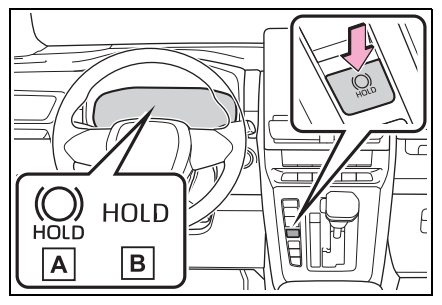
∎ Brake hold system operating condition
The brake hold system cannot be turned on in the following conditions:- The driver’s door is not closed.
- The driver is not wearing the seat belt.
- The parking brake is engaged.
- “Parking Brake Unavailable” or “Parking Brake Malfunction Visit Your
Dealer” is displayed on the multi-information display.
If any of the conditions above are detected when the brake hold system is enabled, the system will turn off and the brake hold standby indicator light will go off. In addition, if any of the conditions are detected while the system is holding the brake, a warning buzzer will sound and a message will be shown on the multi-information display. The parking brake will then be set automatically.
∎ Brake hold function
- If the brake pedal is left released for a period of about 3 minutes after the system has started holding the brake, the parking brake will be set automatically. In this case, a warning buzzer sounds and a message is shown on the multi-information display.
- To turn the system off while the system is holding the brake, firmly depress the brake pedal and press the button again.
- The brake hold function may not hold the vehicle when the vehicle is on a steep incline. In this situation, it may be necessary for the driver to apply the brakes. A warning buzzer will sound and the multi-information display will inform the driver of this situation. If a warning message is shown on the multi-information display, read the message and follow the instructions.
- When do not wish for the parking brake to operate automatically, press and hold the brake hold switch until the standby indicator (green) turns off, and then turn the power switch off.
∎ When the parking brake is set automatically while the system is holding the brakes
Perform any of the following operations to release the parking brake.- Depress the accelerator pedal. (The parking brake will not be released automatically if the seat belt is not fastened.)
- Operate the parking brake switch with the brake pedal depressed. Make sure that the parking brake indicator light goes off.(Click Here)
∎ When an inspection at your Toyota dealer is necessary
When the brake hold standby indicator (green) does not illuminate even when the brake hold switch is pressed with the brake hold system operating conditions met, the system may be malfunctioning. Have the vehicle inspected at your Toyota dealer.∎ If “Brake Hold Malfunction Press Brake to Deactivate Visit Your Dealer” or “Brake Hold Malfunction Visit Your Dealer” is displayed on the multi-information display
The system may be malfunctioning. Have the vehicle inspected by your Toyota dealer.∎ Warning messages and buzzers
Warning messages and buzzers are used to indicate a system malfunction or to inform the driver of the need for caution. If a warning message is shown on the multi-information display, read the message and follow the instructions.∎ If the brake hold operated indicator flashes
(Click Here)WARNING
When stopped on a slippery road The system cannot stop the vehicle when the gripping ability of the tires has been exceeded. Do not use the system when stopped on a slippery road.